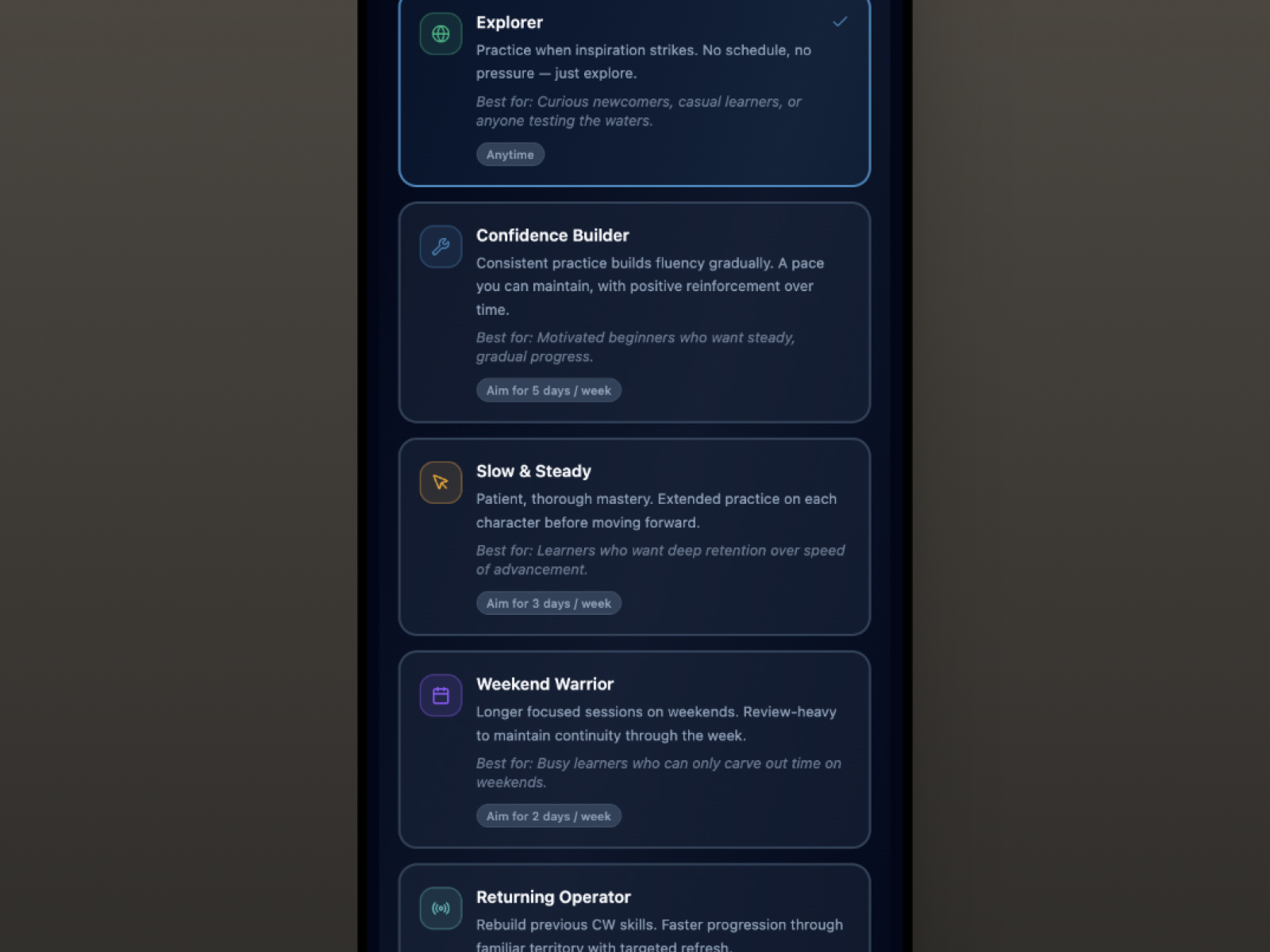
The case study
It looked done.

CadencePickerScreen — six presets, nothing connected to behavior.
A scheduling system. Six presets. A selection screen with icons and descriptions and a frequency badge that appeared in the user's profile. The UI was complete, the interaction was clean, and users could tap any preset and see it reflected in their profile.
Nothing else happened.
No reminder fired. No nudge appeared. No part of the app changed its behavior based on what the user had selected. The label implied a contract. The app never signed it.
The obvious fix wasn't the right fix.
The instinct is immediate: add reminders. Schedule notifications. Collect an email address and send a weekly nudge. It's what every other app does.
This product doesn't have email addresses. By design. The privacy architecture (no accounts, no server, no data transmitted) isn't a gap or a limitation. It's a promise. The community this product is built for is technically sophisticated and privacy-conscious. They chose this product partly because it doesn't ask for anything. Breaking that promise to add a scheduling feature would be a poor trade.
So the question shifted. Not how do we add reminders, but what does accountability look like when you can't contact the user?
That's a more interesting question. And it led somewhere better.
Before building anything — find out if it matters.

Analytics dashboard — event wired, dimension data absent.
There was a more fundamental question to answer before designing any solution at all.
Scheduling guidance is only meaningful after a user has practiced enough to care about optimizing their rhythm. In early beta, users are still finding their footing with the core learning loop. They hadn't been in the product long enough to feel the absence of scheduling support, which meant the feature might be invisible to them entirely.
Building a complete accountability system for something users hadn't yet noticed was missing would be waste. The right move was to find out first.
That required instrumentation. And instrumentation revealed a second problem.
The instrument before the feature.
The analytics platform in use silently discards custom event properties on the current subscription tier. An event tracking scheduling changes was firing correctly, but the contextual data attached to it was being dropped before it could be recorded. The same was true for five other event types across the product. All firing. All dimensionless.
The fix was architectural: encode the dimension directly into the event name. Instead of passing properties that would be discarded, the relevant context becomes part of the name itself. Two sibling events fire alongside the original: full signal, no plan upgrade, historical continuity preserved.
Twenty-seven new analytics goals were registered. The product could finally hear what it was doing.
What the data will say.
With instrumentation in place, the data will answer a specific question: are users engaging with the scheduling feature at all?
If the event never fires, the feature is invisible, and that's useful to know. It may need repositioning, or to surface earlier in the experience. If it fires consistently, the distribution of which presets users move to reveals something genuine: not assumed personas, but actual people expressing preference through behavior.
Either answer is worth waiting for. Building before the answer arrives would just be guessing with extra steps.
The designed solution — ready when the signal arrives.

CadenceSuggestionPill — built and waiting for the signal.
When the data says build, the implementation is already scoped, and deliberately matched to what the architecture actually supports.
Session logging would write the date, duration, and active preset to local storage after each practice session. No server. No personal data. Just enough to know whether someone's practice rhythm matches their stated intention.
At app launch, the last session date gets compared to the preset's frequency expectation. If a user is overdue, a contextual suggestion surfaces. If they're on track, nothing appears. The component that would display this already exists, it just needs the logic layer connected.
The product is a Progressive Web App. Browser notifications can be scheduled locally, from the device, with no server involved. The user opts in. The reminder fires. Nothing leaves the device. The privacy promise holds.
What this case study is really about.
There's a version of every product where every feature gets built as soon as it's imagined. This isn't that product.
The scheduling feature existed as UI for months before this work began. It could have been wired to a backend. Reminders could have been added. The feature could have been declared done.
Instead: the instrumentation was built, the signal was defined, the build trigger was written down, and the feature waits, not because it isn't worth building, but because the product deserves to know it's needed before spending the effort. That discipline is harder than it sounds when you're the person who designed the UI and wants to see it come alive.
It's also the difference between a product that grows with its users and one that accumulates features they never asked for.
Outcomes
Twenty-seven new analytics goals are registered and firing: the instrumentation is the shipped work. Dimension data is now recoverable from five event types that had been silently dimensionless since the product launched. Two additional tracking bugs were found and closed during the same audit. The build trigger is documented. The feature waits for behavioral signal before a line of behavioral logic is written.
That's the outcome: not a shipped feature, but a product that now has the instrumentation to know when the right moment has arrived.
When restraint becomes the feature, the product earns the trust to build what users actually need.
One question led to another...
If every new feature should first earn its place, what does the data say about how people actually spend time with the product?